
How to Monitor Web Pages on Mac with Safari Notify Me

Stani Mihov
Founder & CEO
·

TL;DR
Safari in macOS 27 has a built-in feature called Notify Me that watches a web page and sends a notification when it changes.
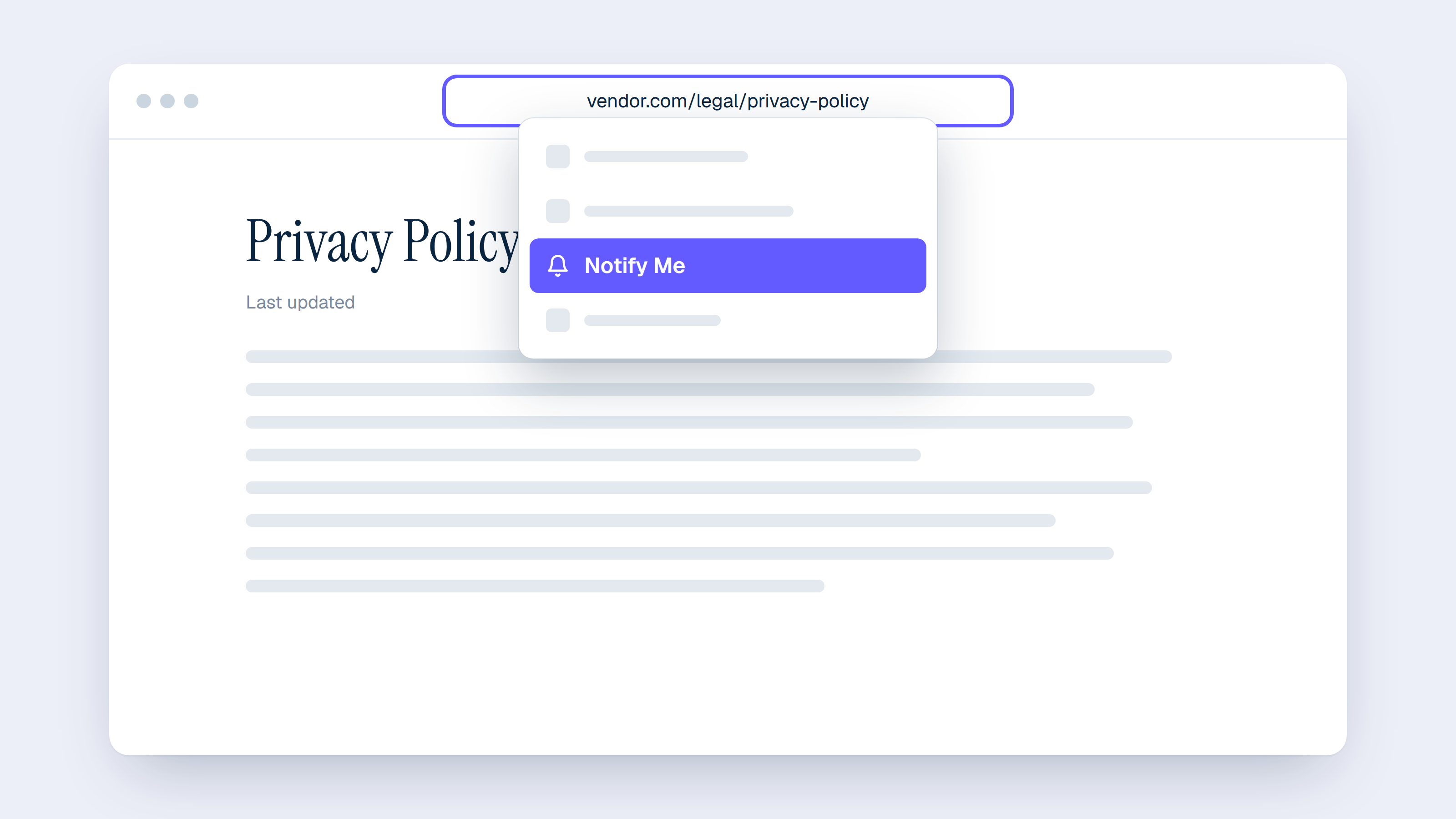
To set it up, open the page, click in the Smart Search field, choose Notify Me, and describe what Safari should look for.
Safari can check the page hourly, daily, weekly, or monthly.
It works for prices, restocks, registrations, and vendor legal pages such as terms of service and privacy policies.
For dozens of vendors and a whole team, Venpo tracks every document and emails plain-English summaries of each change.
Safari in macOS 27 can now watch a web page for you and send a notification when something you care about changes on it.
The feature is called Notify Me, and it arrived with macOS 27 in September 2026. You describe what to look for in a plain sentence, pick how often Safari should check, and Safari does the rest.
This guide covers how to set it up, what people use it for, and how to point it at the pages most teams forget to recheck after signing up for a tool: vendor terms of service, privacy policies, and data processing agreements.
What Safari Notify Me does
Notify Me lets you tell Safari, in your own words, what to watch for on a page. Safari then checks that page on the schedule you choose and sends a notification to your Mac when it detects the update you asked about.
The feature runs on Apple Intelligence, so Safari reads your request and works out whether it can track it on that page. If it cannot, it tells you, and you can try wording the request differently.
Notify Me is also part of Safari on iPhone and iPad with iOS 27 and iPadOS 27.
What you need before you start
A Mac that supports Apple Intelligence, updated to macOS 27.
Apple Intelligence available in your language and region, since Apple notes it is not offered everywhere and that usage limits may apply.
Permission for Safari to send notifications, which you can check in System Settings under Notifications.
How to set up Notify Me in Safari on Mac
Open Safari and go to the page you want to watch.
Click in the Smart Search field at the top of the window, then choose Notify Me.
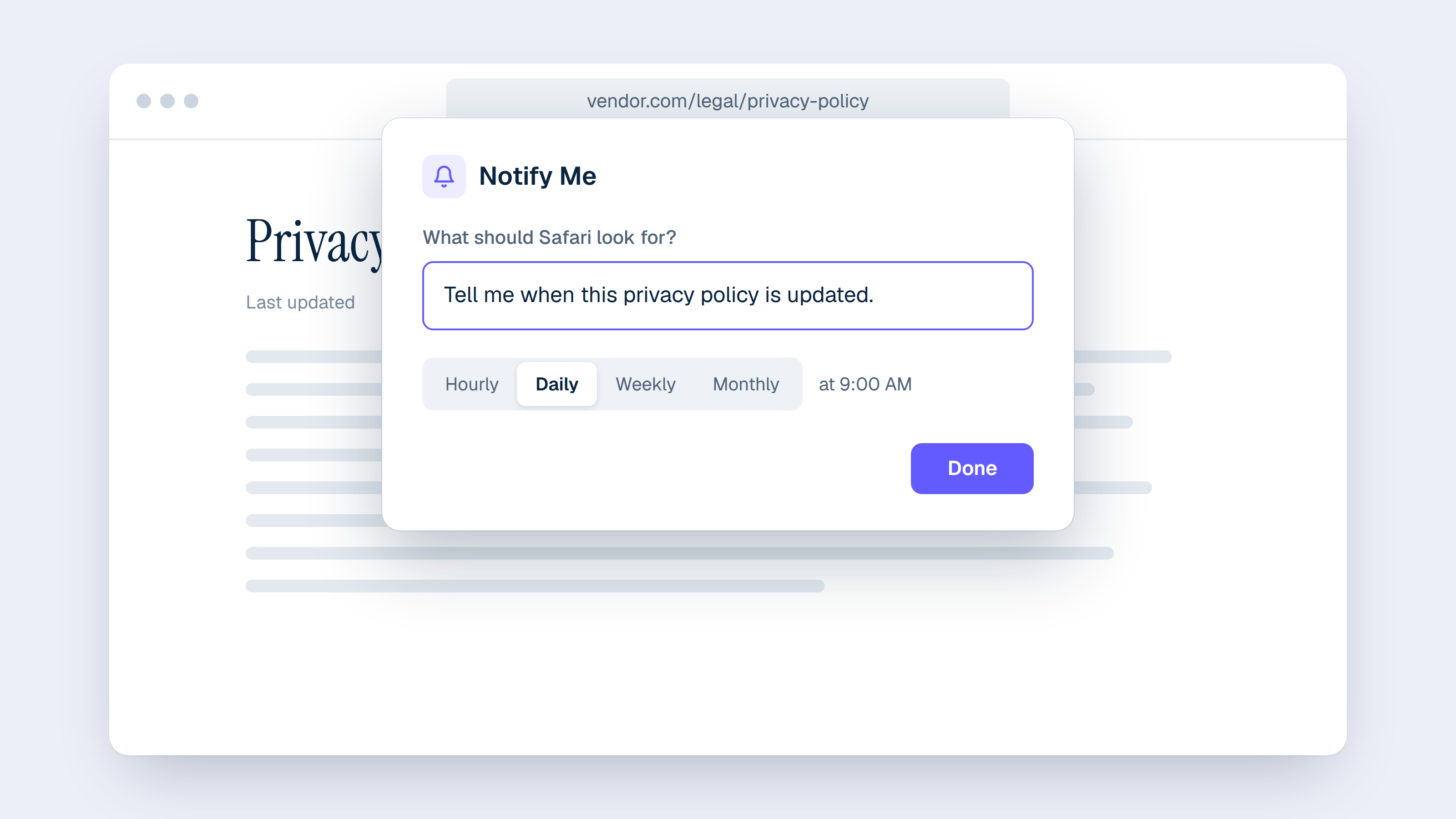
Describe what Safari should look for in one plain sentence.
To change how often Safari checks, click Edit and choose a frequency or time. You can pick hourly, daily, weekly, or monthly, with a set time for hourly and daily checks and set days for weekly and monthly ones.
Click Done. If Safari shows Next instead, your Mac will first ask for permission to send Safari notifications.
From then on, Safari checks the page on your schedule and sends a notification to your Mac when it spots the change. Apple's own instructions are in the Safari User Guide.
How to manage your Notify Me alerts
On a Mac, open Safari, choose Safari > Settings, click the Websites tab, and select Notify Me in the sidebar to see and manage the pages you are watching.
What you can monitor with Notify Me
Anything that appears as text on a page is a good candidate. Common uses include:
A price drop on a product you want to buy.
An item coming back in stock.
Registration opening for an event, a class, or a waitlist.
A new post, a new job listing, or new release notes on a page you follow.
A change to a policy page.
Requests work best when they are specific, for example "Tell me when this item is back in stock" or "Notify me when registration opens."
How to monitor terms of service and privacy policies on Mac
Vendor legal pages suit Notify Me well because they change rarely, and when they do change, the update is easy to miss. As we explain in our guide to the hidden risk of vendor legal changes, most teams read these documents once, at signup.
Open the vendor's legal page, choose Notify Me, and try a request like one of these:
Terms of service: "Tell me when these terms of service are updated."
Privacy policy: "Notify me when the last updated date on this privacy policy changes."
Data processing agreement: "Tell me when this data processing agreement changes."
Subprocessor list: "Notify me when a new company is added to this subprocessor list."
A daily or weekly check is usually enough for legal pages. Since Safari decides whether it can handle a request on each page, set up one page first, confirm Safari accepts the request, and then repeat it for the next vendor. Some vendors publish the same document at more than one address, so watch the page your contract or order form actually links to.
When one page at a time is not enough
Notify Me is set up page by page in your own Safari. That works well for a handful of pages, but a company that relies on dozens of software tools has a terms of service, a privacy policy, a DPA, and often a subprocessor list for each of them. At 30 vendors, that is already more than 100 pages to set up and keep current.
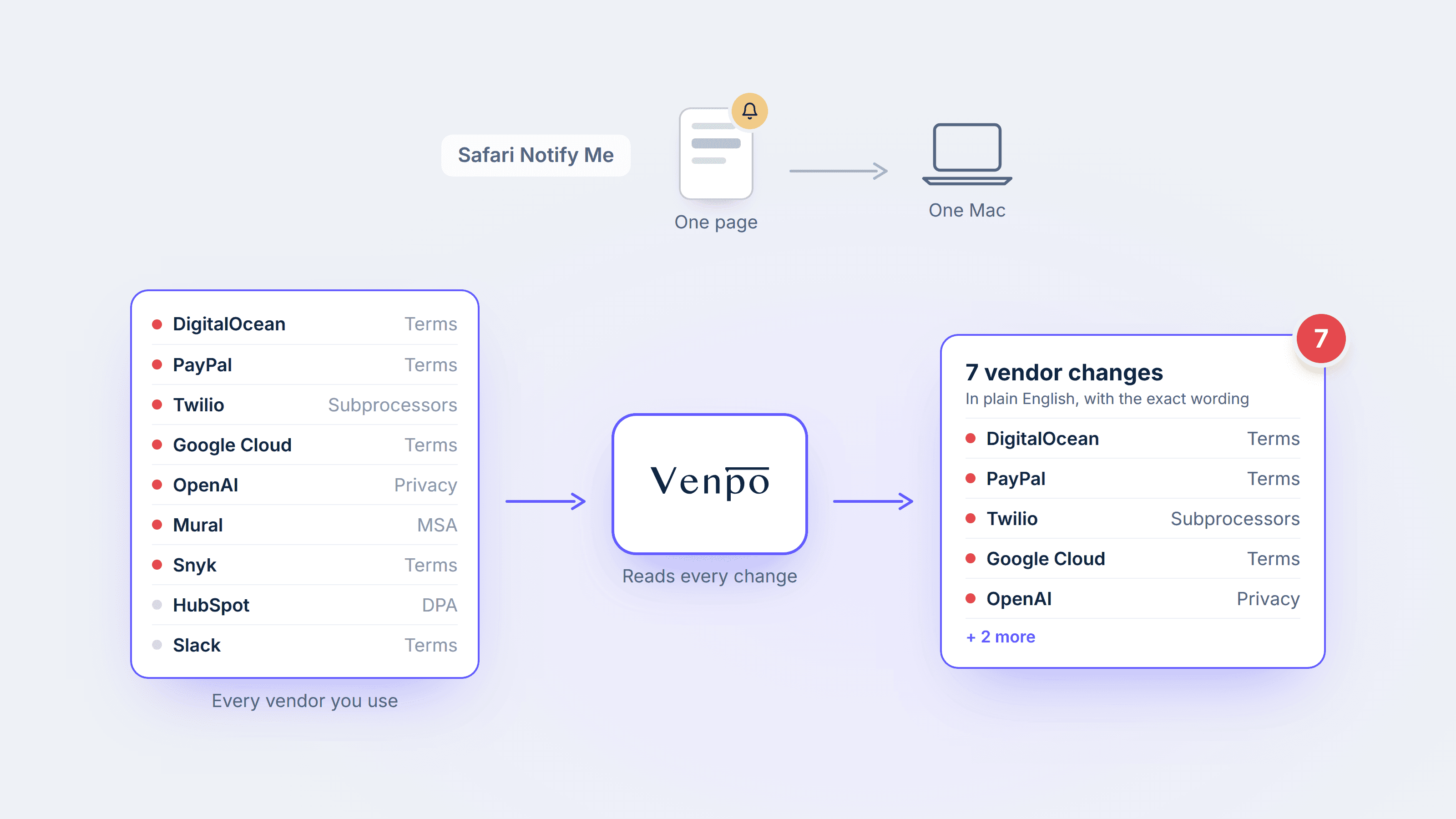
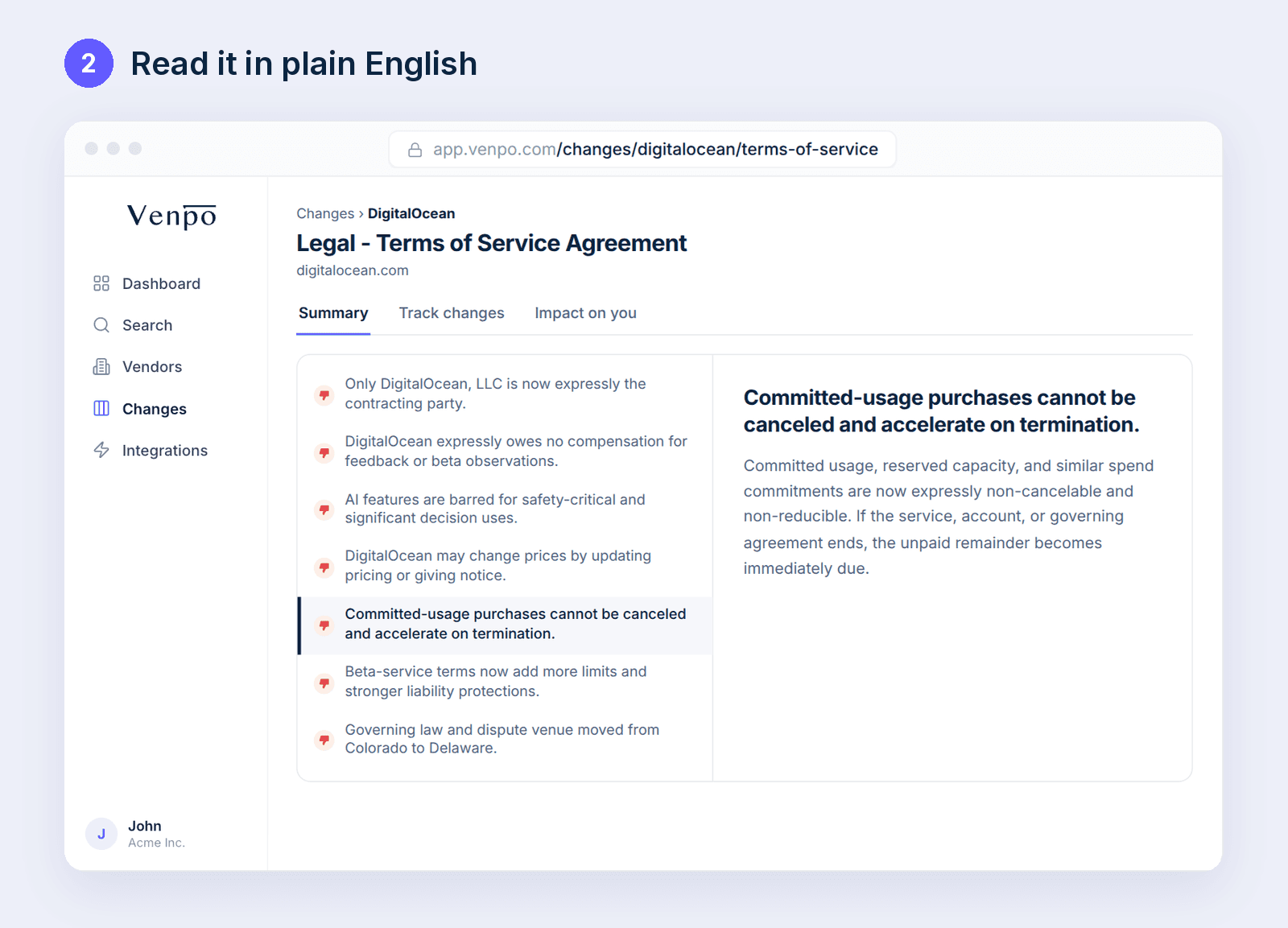
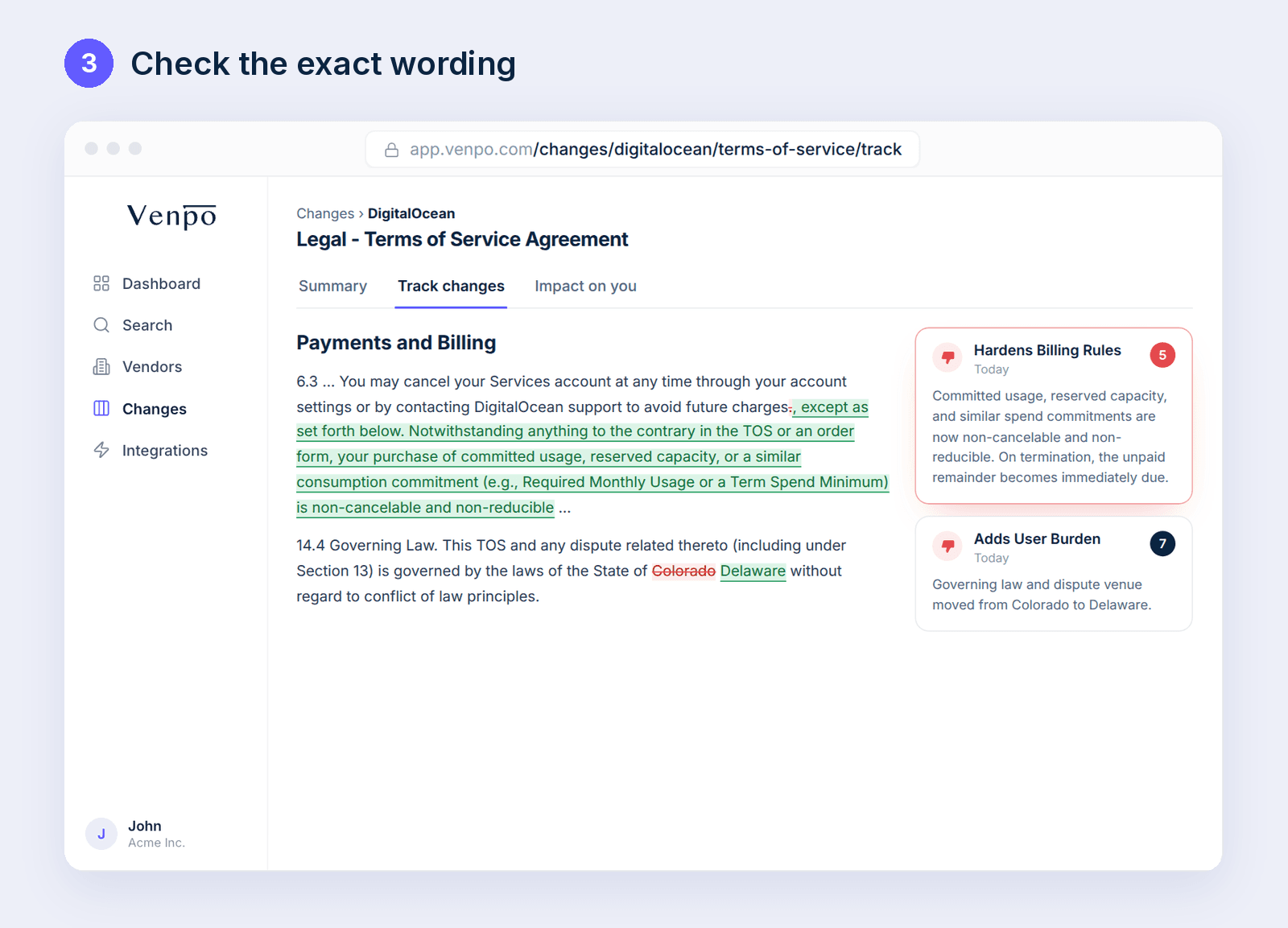
This is the job Venpo is built for. Venpo tracks the legal documents of the vendors your company uses and emails your team a plain-English summary of what changed, and every change comes with a redline that shows the old and new text side by side.
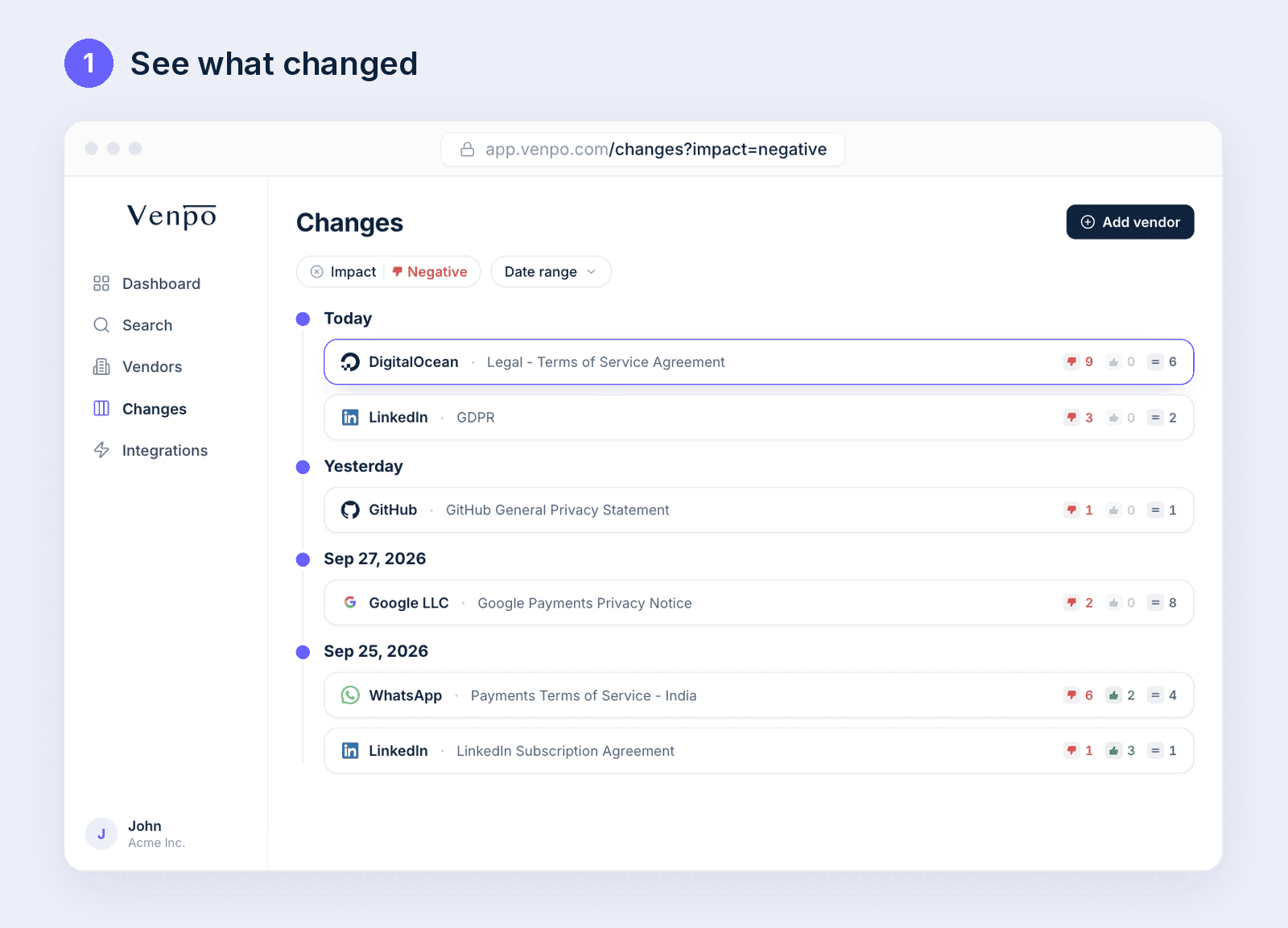
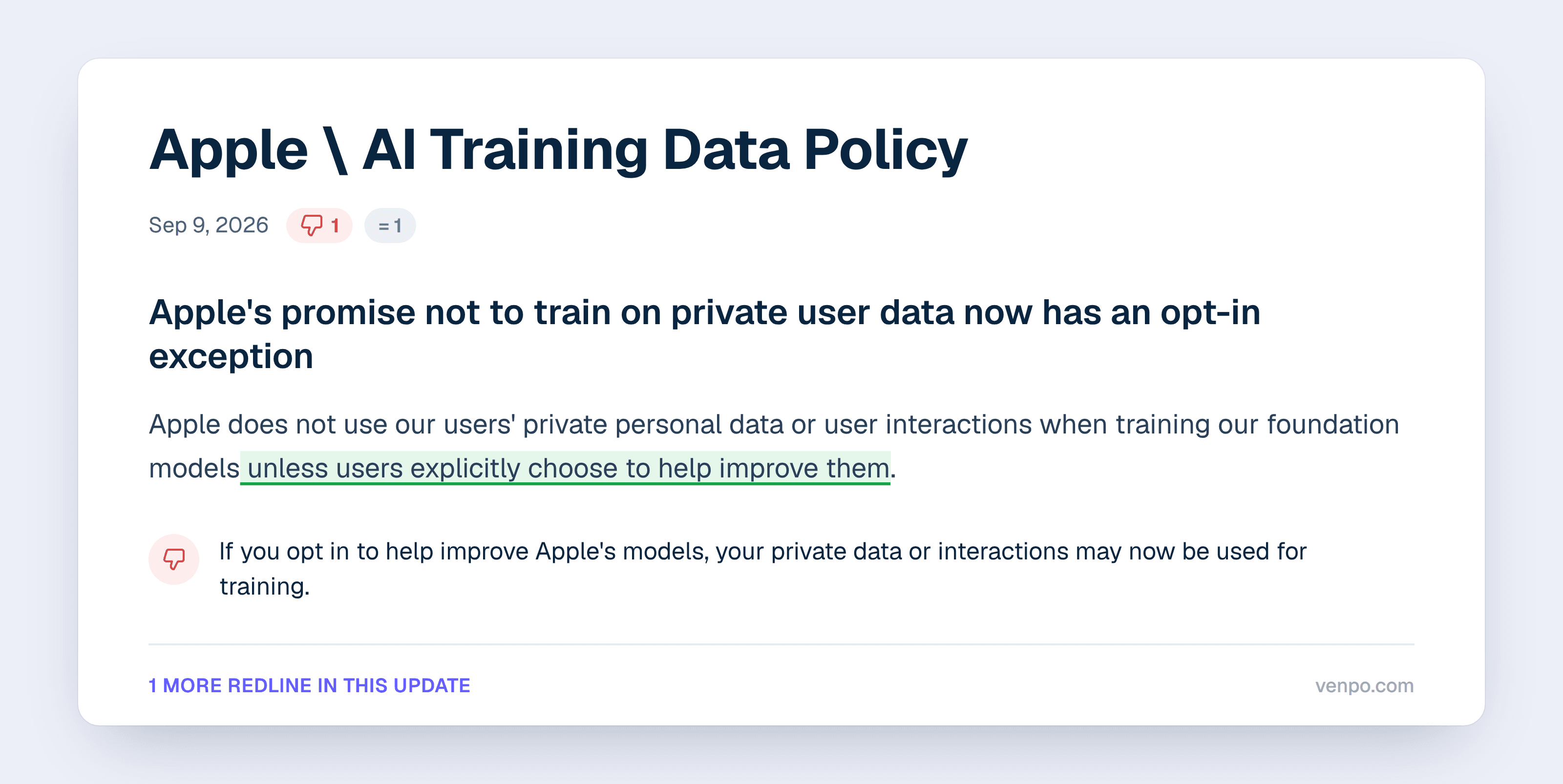
Here is a real example. On September 9, 2026, Apple updated its page on the data used to train its generative AI models. The sentence saying Apple does not use users' private personal data or user interactions to train its foundation models now ends with "unless users explicitly choose to help improve them."
You can see the full Apple redline on Venpo. For more on building a monitoring routine, read our guides on monitoring vendor terms of service, tracking AI subprocessors, and manual vs automated vendor monitoring.
Frequently asked questions
How do I monitor a web page for changes on Mac without an extension?
Update to macOS 27 and use Safari's built-in Notify Me feature: open the page, click in the Smart Search field, choose Notify Me, and describe what to watch for.
How often can Safari check a page for changes?
You can set checks to run hourly, daily, weekly, or monthly.
Does Notify Me work on iPhone and iPad?
Yes, it is also part of Safari in iOS 27 and iPadOS 27.
Why don't I see Notify Me in Safari?
Notify Me relies on Apple Intelligence, which needs a supported device and is not available in every language or region. Check that your Mac runs macOS 27 and that Apple Intelligence is turned on.
Can I track vendor legal documents for my whole company?
Notify Me alerts are set up page by page in your own Safari. To cover your full vendor list with alerts that reach your whole team, a dedicated tool like Venpo tracks every document in one place.
Safari in macOS 27 can now watch a web page for you and send a notification when something you care about changes on it.
The feature is called Notify Me, and it arrived with macOS 27 in September 2026. You describe what to look for in a plain sentence, pick how often Safari should check, and Safari does the rest.
This guide covers how to set it up, what people use it for, and how to point it at the pages most teams forget to recheck after signing up for a tool: vendor terms of service, privacy policies, and data processing agreements.
What Safari Notify Me does
Notify Me lets you tell Safari, in your own words, what to watch for on a page. Safari then checks that page on the schedule you choose and sends a notification to your Mac when it detects the update you asked about.
The feature runs on Apple Intelligence, so Safari reads your request and works out whether it can track it on that page. If it cannot, it tells you, and you can try wording the request differently.
Notify Me is also part of Safari on iPhone and iPad with iOS 27 and iPadOS 27.
What you need before you start
A Mac that supports Apple Intelligence, updated to macOS 27.
Apple Intelligence available in your language and region, since Apple notes it is not offered everywhere and that usage limits may apply.
Permission for Safari to send notifications, which you can check in System Settings under Notifications.
How to set up Notify Me in Safari on Mac
Open Safari and go to the page you want to watch.
Click in the Smart Search field at the top of the window, then choose Notify Me.
Describe what Safari should look for in one plain sentence.
To change how often Safari checks, click Edit and choose a frequency or time. You can pick hourly, daily, weekly, or monthly, with a set time for hourly and daily checks and set days for weekly and monthly ones.
Click Done. If Safari shows Next instead, your Mac will first ask for permission to send Safari notifications.
From then on, Safari checks the page on your schedule and sends a notification to your Mac when it spots the change. Apple's own instructions are in the Safari User Guide.
How to manage your Notify Me alerts
On a Mac, open Safari, choose Safari > Settings, click the Websites tab, and select Notify Me in the sidebar to see and manage the pages you are watching.
What you can monitor with Notify Me
Anything that appears as text on a page is a good candidate. Common uses include:
A price drop on a product you want to buy.
An item coming back in stock.
Registration opening for an event, a class, or a waitlist.
A new post, a new job listing, or new release notes on a page you follow.
A change to a policy page.
Requests work best when they are specific, for example "Tell me when this item is back in stock" or "Notify me when registration opens."
How to monitor terms of service and privacy policies on Mac
Vendor legal pages suit Notify Me well because they change rarely, and when they do change, the update is easy to miss. As we explain in our guide to the hidden risk of vendor legal changes, most teams read these documents once, at signup.
Open the vendor's legal page, choose Notify Me, and try a request like one of these:
Terms of service: "Tell me when these terms of service are updated."
Privacy policy: "Notify me when the last updated date on this privacy policy changes."
Data processing agreement: "Tell me when this data processing agreement changes."
Subprocessor list: "Notify me when a new company is added to this subprocessor list."
A daily or weekly check is usually enough for legal pages. Since Safari decides whether it can handle a request on each page, set up one page first, confirm Safari accepts the request, and then repeat it for the next vendor. Some vendors publish the same document at more than one address, so watch the page your contract or order form actually links to.
When one page at a time is not enough
Notify Me is set up page by page in your own Safari. That works well for a handful of pages, but a company that relies on dozens of software tools has a terms of service, a privacy policy, a DPA, and often a subprocessor list for each of them. At 30 vendors, that is already more than 100 pages to set up and keep current.
This is the job Venpo is built for. Venpo tracks the legal documents of the vendors your company uses and emails your team a plain-English summary of what changed, and every change comes with a redline that shows the old and new text side by side.
Here is a real example. On September 9, 2026, Apple updated its page on the data used to train its generative AI models. The sentence saying Apple does not use users' private personal data or user interactions to train its foundation models now ends with "unless users explicitly choose to help improve them."
You can see the full Apple redline on Venpo. For more on building a monitoring routine, read our guides on monitoring vendor terms of service, tracking AI subprocessors, and manual vs automated vendor monitoring.
Frequently asked questions
How do I monitor a web page for changes on Mac without an extension?
Update to macOS 27 and use Safari's built-in Notify Me feature: open the page, click in the Smart Search field, choose Notify Me, and describe what to watch for.
How often can Safari check a page for changes?
You can set checks to run hourly, daily, weekly, or monthly.
Does Notify Me work on iPhone and iPad?
Yes, it is also part of Safari in iOS 27 and iPadOS 27.
Why don't I see Notify Me in Safari?
Notify Me relies on Apple Intelligence, which needs a supported device and is not available in every language or region. Check that your Mac runs macOS 27 and that Apple Intelligence is turned on.
Can I track vendor legal documents for my whole company?
Notify Me alerts are set up page by page in your own Safari. To cover your full vendor list with alerts that reach your whole team, a dedicated tool like Venpo tracks every document in one place.
Real-time change notifications
Stay ahead of every legal change
Get updates, product news and expert tips on navigating legal changes
Dispute resolution clause now requires mandatory arbitration in all regions
Data retention period extended from 2 years to 5 years for all services
New restrictions on AI-generated content in product descriptions
Third-party data sharing expanded to include analytics partners
Real-time change notifications
Stay ahead of every legal change
Get updates, product news and expert tips on navigating legal changes
Dispute resolution clause now requires mandatory arbitration in all regions
Data retention period extended from 2 years to 5 years for all services
New restrictions on AI-generated content in product descriptions
Third-party data sharing expanded to include analytics partners